Does Using iFrames Hurt SEO? Best Tips to Manage iFrame SEO Impact
- Up rango
- Mar 12
- 5 min read

Many website owners add embedded content to their pages using iFrames maps, videos, tools, or external widgets. While this technique can improve functionality, it often raises an important question:
Does using iFrames negatively affect SEO rankings?
This concern is valid. Search engines prioritize content that they can easily crawl, understand, and index. When content is embedded through an iFrame, it sometimes exists outside the main HTML structure of the page. As a result, search engines may struggle to interpret its value.
Understanding the iframe SEO impact is essential for website owners, marketers, and developers who want to balance usability with strong search visibility. In this guide, we’ll explain how iFrames influence SEO, when they are safe to use, and the best ways to optimize them for search engines.
What is an iFrame in Web Development?
An iFrame (Inline Frame) is an HTML element that allows one webpage to display content from another webpage inside it.
For example, websites commonly use iFrames to embed:
Google Maps
YouTube videos
Payment gateways
External applications
Social media posts
Instead of hosting the content directly on the page, the site simply displays it from another source.
While this is convenient, it can create challenges for SEO if not handled properly.
Understanding the iFrame SEO Impact
The iframe SEO impact mainly depends on how search engines interpret embedded content.
Search engines typically crawl the main page’s HTML content, not always the embedded content inside the iFrame.
This means:
Content inside the iFrame may not contribute to page relevance
Internal linking signals might be weaker
Search engines might treat the embedded page separately
However, this does not mean iFrames are always harmful. Their impact depends on how they are used.
Best Situations Where Using iFrames Is Safe for SEO
Not all uses of iFrames cause SEO problems. In many cases, they are completely safe.
1. Embedding Videos
Many websites embed videos through iFrames. For example, video platforms provide an embed code that uses this format.
Since the content is primarily visual, SEO impact is minimal.
2. Maps and Location Widgets
Businesses often embed maps to help visitors find physical locations.
Because this is a supporting element rather than core content, it rarely affects SEO rankings.
3. Third-Party Tools
Scheduling systems, calculators, or booking widgets are often embedded via iFrames.
These tools enhance user experience even though they may not contribute directly to search rankings.
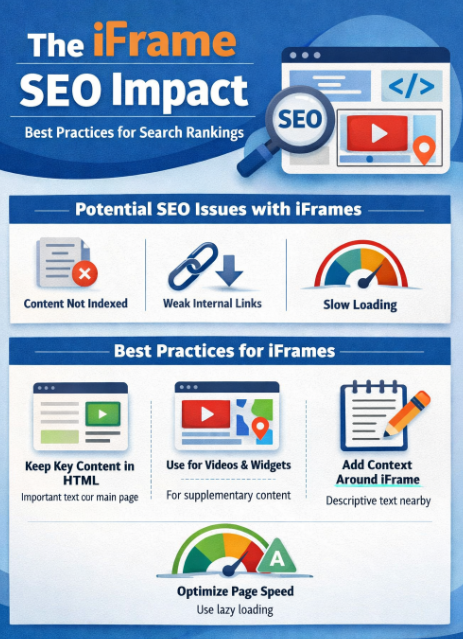
Top SEO Risks of Using iFrames
Despite their usefulness, iFrames can create several SEO challenges if misused.
1. Search Engines May Not Index the Content
If important text content is placed inside an iFrame, search engines might ignore it.
This means the content will not contribute to keyword rankings.
2. Reduced Page Relevance
Search engines determine page relevance by analyzing visible HTML content.
When large portions of content are embedded externally, the main page may appear thin.
3. Internal Linking Limitations
Links inside an iFrame belong to the embedded page, not the main page.
This can weaken internal linking strategies.
4. Performance Issues
Some embedded resources load slowly, which can impact page speed and user experience.
Page speed is a known ranking factor, so slow iFrames can indirectly affect SEO.
Best Practices to Reduce iFrame SEO Impact
Website owners can still use iFrames safely by following a few smart SEO strategies.
1. Keep Important Content Outside the iFrame
Core SEO content should always exist directly in the page’s HTML.
Examples include:
Headings
Product descriptions
Blog text
Internal links
The iFrame should only support the main content.
2. Use iFrames for Supporting Content Only
Treat iFrames as interactive elements, not the main information source.
Examples:
Videos
Maps
Calculators
Booking forms
3. Add SEO Context Around the iFrame
Search engines understand pages better when surrounding content explains the embedded element.
Example:
Add a heading above the embedded video
Include a short description below it
Use relevant keywords naturally
4. Optimize Page Speed
If the embedded content loads slowly, it can harm the page experience.
To reduce this risk:
Use lazy loading
Embed only necessary content
Avoid too many iFrames on one page
5. Use Alternative Content When Possible
Sometimes it’s better to host content directly rather than embedding it.
For example:
Upload videos directly if SEO value matters
Place key text inside the page instead of an embedded source
Real-World Example of iFrame SEO Impact
Imagine a blog that embeds an entire article from another site using an iFrame.
To a search engine, the page might appear to contain very little text content. As a result, the page may struggle to rank for its target keywords.
However, if the article text is written directly on the page and the iFrame is used only for a demo or video, the page remains SEO-friendly.
Many SEO professionals including teams working on technical optimization at platforms like UpRango recommend using iFrames carefully so that they enhance user experience without replacing valuable on-page content.
Top Technical SEO Tips for iFrame Optimization
Here are additional technical tips to minimize iframe SEO impact:
Use descriptive headings around embedded content
Avoid placing important navigation links inside iFrames
Ensure embedded resources come from secure sources (HTTPS)
Limit the number of iFrames on a single page
Always prioritize original page content
These steps help search engines better understand the purpose of the page.
Frequently Asked Questions (FAQ)
1. Do iFrames hurt SEO rankings?
iFrames do not automatically harm SEO. However, if important content is placed inside them, search engines may not index that content properly, which can affect rankings.
2. Can Google crawl iFrame content?
Search engines can sometimes access iFrame content, but it is usually treated as part of the external page rather than the main page embedding it.
3. When should websites use iFrames?
iFrames are best used for embedding external elements such as maps, videos, widgets, or third-party tools that improve user experience but are not essential for SEO.
4. Are embedded videos via iFrames bad for SEO?
No. Embedded videos are generally safe for SEO, especially when accompanied by descriptive text and context on the page.
5. What is the best way to avoid negative iFrame SEO impact?
The best approach is to keep your primary content directly in the page HTML and use iFrames only for supplementary features.
Conclusion
The iframe SEO impact is often misunderstood. iFrames themselves are not harmful, but problems arise when important content is placed inside them instead of on the main page.
Search engines prioritize content that is easy to crawl, index, and understand. By keeping essential text content within the page structure and using iFrames only for supporting elements, websites can maintain both functionality and strong search visibility.
In practice, the most effective strategy is to balance leveraging embedded tools for user experience while ensuring the page still delivers clear, accessible content for search engines.
When implemented thoughtfully, iFrames can coexist with solid SEO without compromising rankings.


Comments